Building kev.bot: a glass portfolio with a real backend
The full tour of how this site is built and run: React 19 over FastAPI, content that lives in a database and feeds the pages, the assistant and the résumé PDF, prerendered routes for crawlers, a pull-only deploy with two environments on one box, and the bugs that only showed up on a phone.
Kevin Witherow · 2026-10-12 · 28 min read
Most portfolio sites are a static page with a résumé on it. I wanted mine to be a small, real product: content I can edit from my phone without a deploy, a blog with proper rendering, an assistant that knows what is on the site, a résumé that is generated from the same data as the pages, and a deploy path that never needs me to open a terminal on the server. This is the long version of how kev.bot is put together, the decisions that made it simple to run, and the handful of bugs that were worth writing down.
It is long because the site is bigger than it looks. If you only want the shape of it, the first two sections and the diagrams carry most of the weight. The rest is for people who are building something similar and want to know where the sharp edges are.
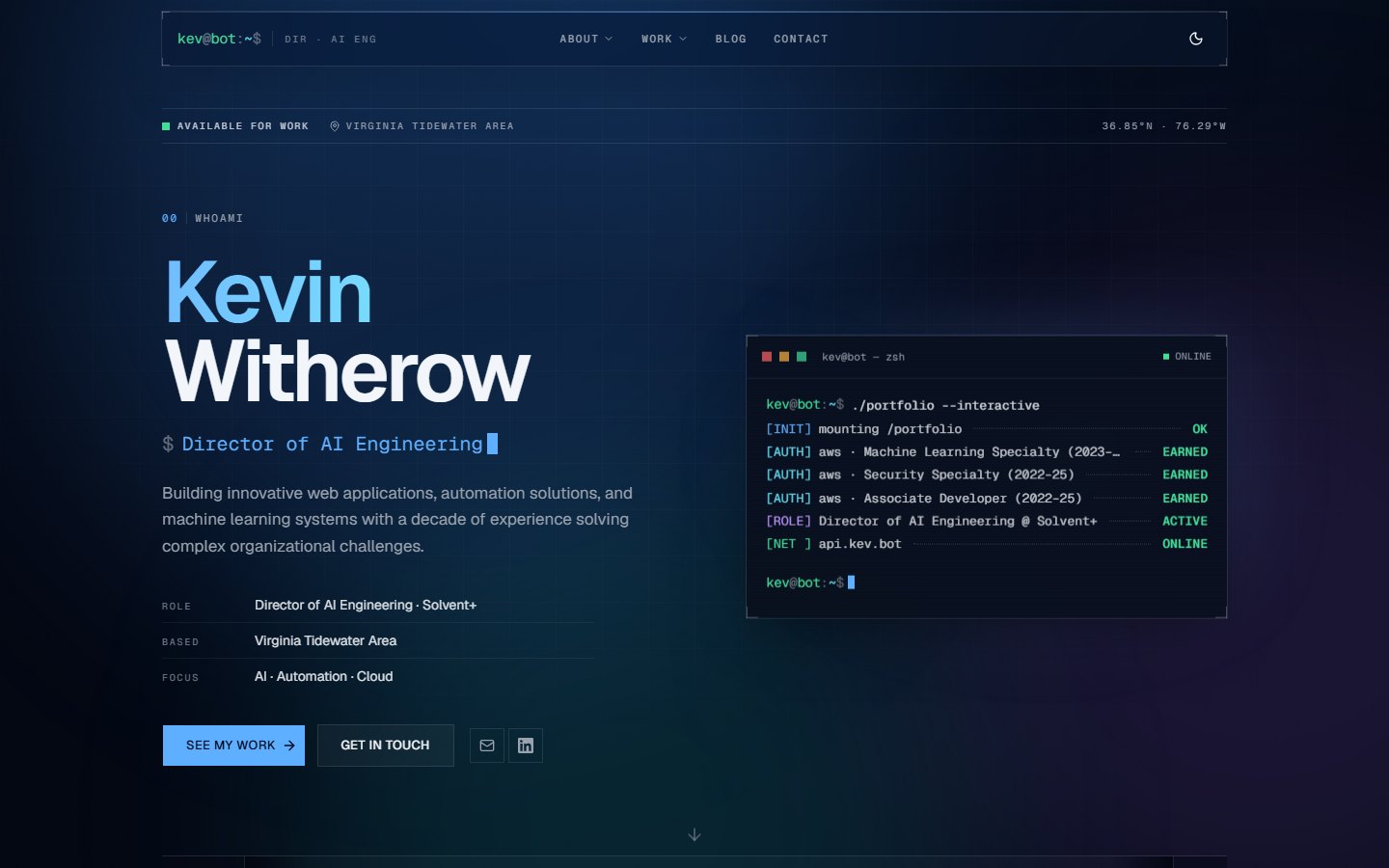
The shape of it
Two services and a reverse proxy. The UI is a React 19 single-page app built by Vite; the API is FastAPI on SQLAlchemy 2, with Postgres in production and SQLite on a laptop. Caddy sits in front of both: it serves the built files, forwards anything under /api to the API over loopback, and hands a few other paths to the API too, because those are the ones that need real HTML rather than an app shell.
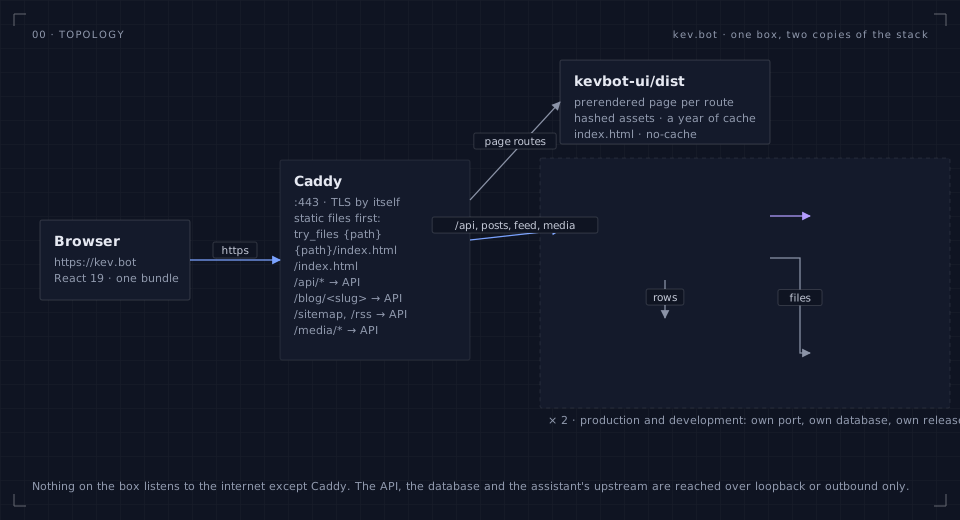
That is the whole topology. There is no CDN, no serverless layer, no build service, no queue. One box runs two copies of the stack (a development copy and the production copy, more on that below), and the parts talk over loopback. Nothing on the box listens to the internet except Caddy.
| Piece | Choice | Why |
|---|---|---|
| UI | React 19 · Vite · Tailwind v4 · shadcn/ui on Base UI | Fast dev loop, sharp defaults, no runtime CSS |
| Motion | motion (Framer's successor) | Variants and layout animation without hand-rolled timing |
| API | FastAPI · SQLAlchemy 2 (async) · Alembic · uv | Typed request models, migrations, one process to run |
| Database | Postgres 16 in production · SQLite in development | Same code path through SQLAlchemy; a laptop needs nothing installed |
| Edge | Caddy | Automatic TLS, a readable config, try_files for the SPA |
| Assistant | Claude through the Anthropic SDK | Streams over server-sent events, grounded in the content bundle |
| fpdf2 | Real text in standard sections, built on request from the live content | |
| Marks | simple-icons + lucide | Brand marks as tree-shaken paths, plain icons where a brand is trademark-restricted |
The JavaScript bundle is a hair over one megabyte before compression, about a third of that over the wire. The admin area is its own chunk, so a visitor never downloads it.
Content is data, not JSX
Everything you read on the site, from the bio and the stats to the timeline, the skills, the projects, the ventures and the assistant's prompts, lives in the database as ten JSON collections. The API serves them in one call, and the UI bundles the seed copy as initial data so the first paint never waits on the network:
export function useContent(): ContentBundle {
  const q = useQuery({
    queryKey: CONTENT_QUERY_KEY,
    queryFn: ({ signal }) => api<ContentBundle>("/content", { signal, auth: false }),
    initialData: SEED_CONTENT,
    initialDataUpdatedAt: 0,
    staleTime: 5 * 60_000,
  })
  return q.data ?? SEED_CONTENT
}
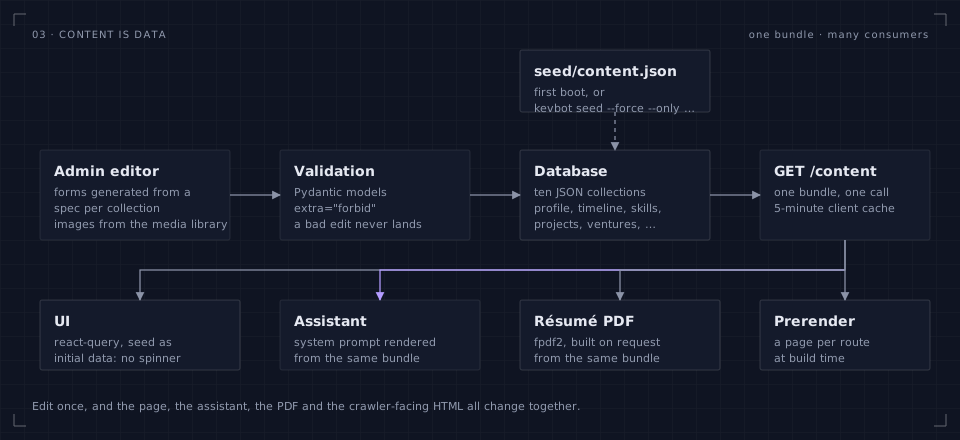
Each collection has a Pydantic model on the API side with extra="forbid", so the admin's schema-driven editor validates on save and a bad edit never reaches a page. The editor itself is generated from a spec per collection: a list of fields with a kind (text, textarea, number, select, image, a list of strings, a nested object, a list of objects), a label and a help line. Adding a field to the site is three small edits: the Pydantic model, the TypeScript type, and the spec. The form, the validation and the API contract follow.
The seed file is only the initial copy. After the first boot the database is the truth, and a CLI command round-trips it back into the seed whenever I want to commit a snapshot. The other direction has a safety catch: a reseed only ever replaces the collections you name, so pushing a new timeline entry from the repo never clobbers a profile edit made in the admin an hour earlier.
# Push three collections from the repo's seed into an environment's database.
# Anything not named is left exactly as it is.
kevbot seed --force --only timeline,skills,projects
Tip: Treating copy as data sounds like overkill for a personal site, right up until the third time you want to fix a typo from your phone. The admin area is a form over the same JSON, and the form was generated, not written.
One consequence took me a moment to appreciate. Because the schema is strict, a running API process validates every row it reads against the models it loaded at start-up. Add a field to the schema, reseed the database with rows that carry the new field, and an API process that has not been restarted will refuse those rows with a 500 until it is. That is the right behaviour (the alternative is silently dropping data), but it means the order of operations on a deploy is: restart the API first, then reseed. The deploy script does exactly that; my laptop occasionally forgets.
The design system in one file
The look is a single stylesheet: colour tokens in OKLCH for both themes, a handful of glass utilities, and a near-zero radius so panels read as crisp rectangles rather than cards. Blue leads; cyan, violet and mint support; amber is reserved for warnings and never used for a series in a chart.
.dark {
  --background: oklch(0.13 0.026 262);
  --foreground: oklch(0.97 0.006 250);
  --brand: oklch(0.74 0.15 252);
  --glass-strong: oklch(0.185 0.03 262 / 84%);
}

@utility glass-strong {
  background-color: var(--glass-strong);
  backdrop-filter: blur(28px) saturate(160%);
  box-shadow:
    inset 0 1px 0 0 var(--glass-highlight),
    0 0 0 1px var(--glass-border),
    var(--glass-shadow);
}
OKLCH earns its keep the moment you build the second theme. Lightness and chroma are perceptual, so "the same blue, a step lighter" is a number change rather than an afternoon with a colour picker, and a light palette can be derived from the dark one by moving two channels. The terminal card on the home page and the code blocks on this page force the dark palette on themselves with one utility, so they stay a lit screen on paper when the site is in light mode.
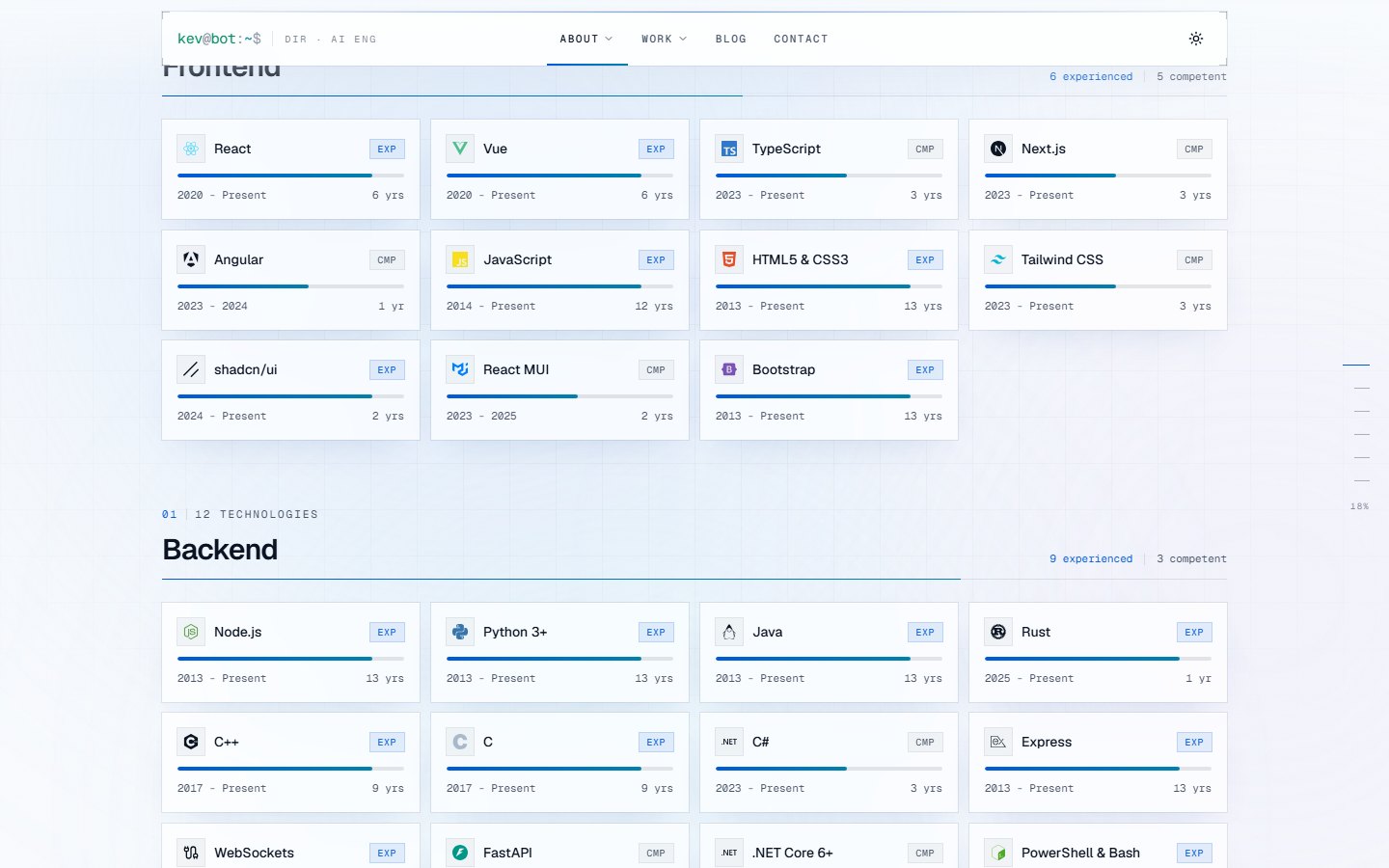
Light mode took three rounds, and the sequence is a small lesson in restraint. The first pass was a flat off-white that read as unfinished. The second pass over-corrected: saturated colour fields and a visible gradient that looked dramatic in a screenshot and tiring on a real page. The third pass kept the idea (an atmosphere behind the glass) and cut the intensity by about two thirds: large, heavily blurred blobs at twelve to twenty percent alpha, a grid at five percent ink, and near-white glass. The rule I landed on is that a background should be something you can only see when you look for it.
Motion that does not fight you
Sections rise in as you reach them. That is a stagger container with child variants, driven by the section entering the viewport. It looked right for a week and then a post card went missing.
The blog list filters by tag. Pick a tag, then clear it, and the card that should have come back stayed invisible. The data was fine (it was cached, so the swap was instant), the DOM was fine, and the card's computed opacity was zero. The cause is a property of gesture variants in motion that is easy to miss: a whileInView variant only reaches the children that exist when it fires. A child mounted later, under a parent that already entered the viewport, inherits the initial state and nothing ever tells it to leave.
export function Reveal({ children, ...props }: HTMLMotionProps<"div">) {
  const [shown, setShown] = useState(false)
  return (
    <motion.div
      variants={staggerContainer}
      initial="hidden"
      animate={shown ? "show" : "hidden"}     // propagates to late children
      onViewportEnter={() => setShown(true)}  // the viewport still gates it
      viewport={{ once: true, margin: "-60px 0px -60px 0px" }}
      {...props}
    >
      {children}
    </motion.div>
  )
}
Driving the same variant through animate fixes the whole class of bug, because animate is inherited by children whenever they mount. The viewport observer still decides when; it just no longer decides who. I had hit the identical mechanism a day earlier with the tag pills themselves (they mount after the posts query resolves, after the stagger has played) and fixed that one locally. The second time, the fix went into the wrapper.
Note: The site respects
prefers-reduced-motionthrough motion's global config, so the stagger, the ticker and the terminal typing all collapse to their end state for anyone who has asked for that.
Scroll-spy without an observer
The section index pinned to the right edge of this page (on a wide screen) needs to know which heading is current. The obvious tool is IntersectionObserver, but it has an awkward edge case: a short final section near the bottom of the page may never cross the trigger line, so it can never become active. A scroll listener that asks "which heading has passed a line a third of the way down the viewport" has no such gap, and it costs one measurement per frame:
const measure = () => {
  const doc = document.documentElement
  const atBottom = window.innerHeight + window.scrollY >= doc.scrollHeight - 2
  let current = ids[0]
  if (atBottom) current = ids[ids.length - 1]
  else {
    const line = window.innerHeight * 0.3
    for (const id of ids) {
      const el = document.getElementById(id)
      if (el && el.getBoundingClientRect().top <= line) current = id
      else break
    }
  }
  setActive((prev) => (prev === current ? prev : current))
}
The heading ids come from github-slugger on the Markdown source and from rehype-slug inside the renderer. Both produce the same slugs, so the index can be built before the article has rendered. Below the widest breakpoint the same list becomes a chip strip under the header; on a phone it becomes nothing, because a phone has no spare edge.
The career map
The experience page opens with a map: one lane per organisation, a bar from first role to last, a milestones lane with education and events, and a line for today. It is an SVG-free layout (plain divs on a percentage grid) because the bars need to be focusable, hoverable and clickable, and that is easier with elements than with paths.
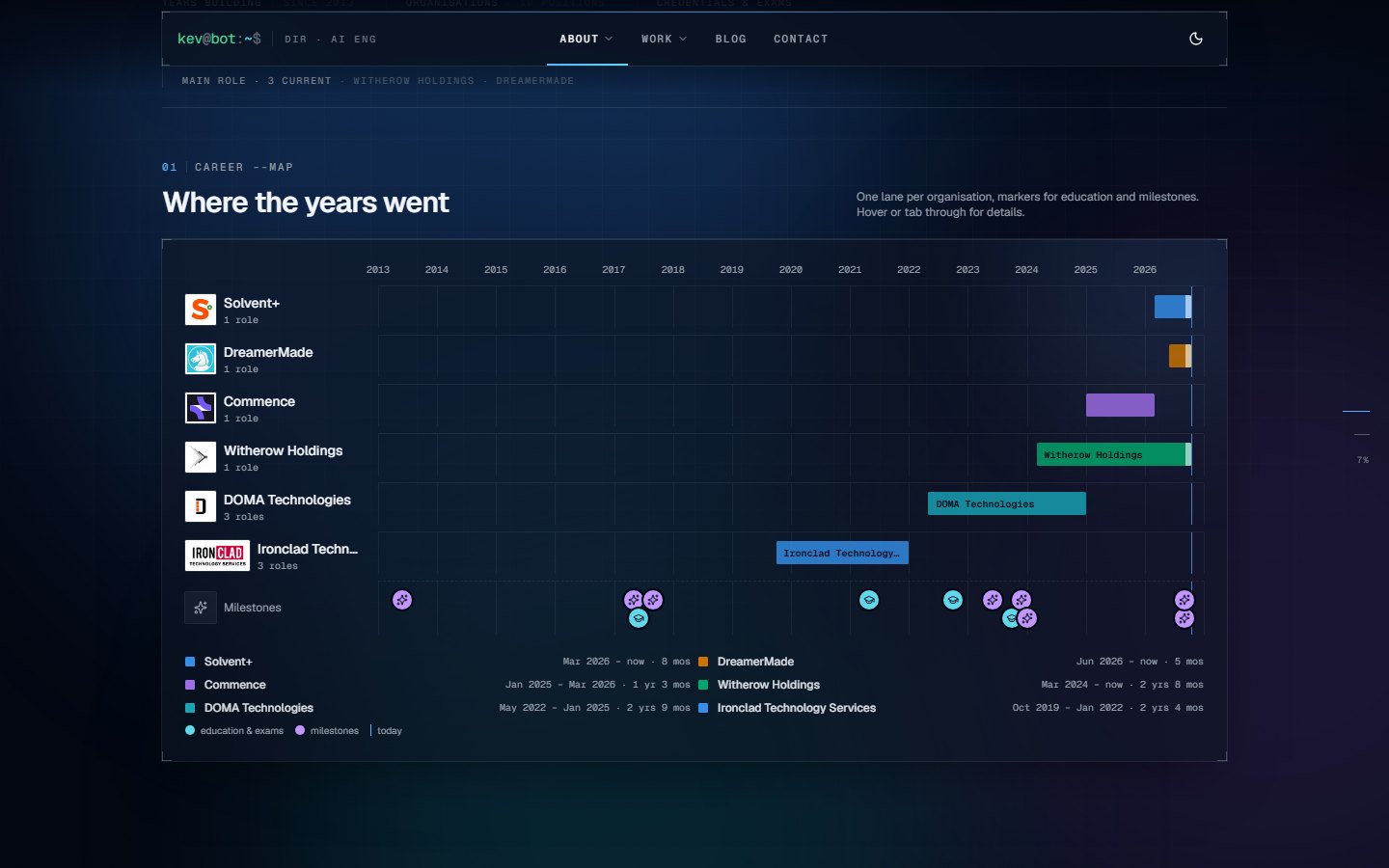
Three rules from the data-visualisation playbook shaped it:
- Colour follows the entity, never its rank. Each organisation gets a fixed hue from a short categorical list, in a fixed order, and keeps it everywhere it appears: the map, the legend, the filter row, the timeline's accent stripe. Filtering the timeline never repaints the survivors.
- The primary organisation leads. The current employer is pulled to the front of the list before colours are assigned, so it always gets the brand blue, however the dates fall.
- A hover card is a sibling. The bar clips its own label, so the card that appears above it lives next to it in the DOM, anchored left for most bars and right for the ones near the present-day edge, where a centred card would run out of the panel.
The same organisation record carries a logo and a site. Where a mark exists it sits on a white tile; where one does not, a two-letter monogram in the organisation's colour stands in. Wordmarks widen the tile; square marks keep it square. One mark came only as an inverted version with a white band through it, so it was baked onto its own dark rounded tile rather than fought with.
Brand marks without a logo pile
The skills page shows fifty-odd technologies, and most of them have a recognisable mark. The marks come from simple-icons as named imports, which Vite tree-shakes down to the paths actually used; a mark is a <path> filled with currentColor and coloured with the brand's hex. Two details matter:
- Near-black marks need a different colour. Next.js, Express and shadcn ship as black. On a dark tile they vanish. A luminance check swaps those to the foreground colour, and it has to be done through a class, not an inline style, because an inline
colorbeats any.darkrule. - Some marks are not in the set on purpose. Most AWS and Microsoft marks are trademark-restricted and simple-icons does not carry them. Those fall back to a plain lucide icon (a cloud, a database, a workflow) so the grid stays even.
The home page's stack ticker uses the same component at fourteen pixels, which is the smallest size at which the marks still read.
SEO for a single-page app
A SPA ships one index.html, which carries the wrong title and description for every page except the home page. Two fixes, one per kind of page:
- Static routes are prerendered at build time. A post-build script writes
dist/<route>/index.htmlfor every public page (eleven of them) with its own title, canonical URL, OpenGraph tags, JSON-LD and a semantic skeleton of the content. Caddy serves it withtry_files {path} {path}/index.html /index.html. - Post pages are rendered by the API. Caddy routes
/blog/<slug>to the API, which returns the built shell with the post's meta tags and the Markdown rendered to HTML inside#root. The app then boots on top of it.
@router.get("/blog/{slug}", response_class=HTMLResponse)
async def post_page(slug: str, db: DB, settings: SettingsDep) -> Response:
    shell = get_shell(settings).text()  # the built index.html, re-read when it changes
    post = await blog_svc.get_by_slug(db, slug, published_only=True)
    if post is None:
        doc = render_shell(shell, title="Not found", url=url, noindex=True)
        return HTMLResponse(doc, status_code=404)
    article = f"<article><h1>{_esc(post.title)}</h1>{render_markdown(post.body)}</article>"
    return HTMLResponse(
        render_shell(shell, title=post.title, url=url, type_="article", root_html=article)
    )
@post path_regexp ^/blog/[^/]+/?$
handle @post {
    reverse_proxy localhost:{api_port} {
        @down status 500 502 503 504
        handle_response @down {
            rewrite * /index.html
            file_server
        }
    }
}
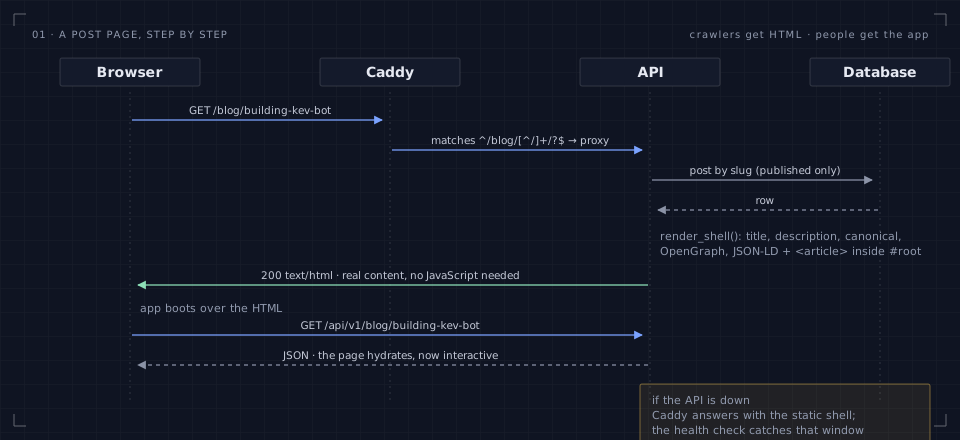
Warning: If the API is down, the fallback above serves the static shell so the page still loads. Crawlers get the generic meta tags in that window, which is why the health check runs before a deploy is called done.
This path had a real bug in production for about a day. The prerender writes the home page's skeleton into #root of the built shell, and the API's renderer replaced the literal empty <div id="root"></div>. After the first prerendered build, that string no longer existed, the replace never fired, and every post page shipped without its article. Crawlers saw a home page with a blog title. The fix was to replace whatever the root holds, and the regression test now uses a prerendered shell as its fixture rather than an empty one.
The blog you are reading
Posts are Markdown in the database. The renderer is react-markdown with GFM, rehype-slug for heading ids and rehype-highlight for code, plus a small set of extensions that this post leans on:
- Callouts in the GitHub style: a blockquote whose first line is a bracketed
!NOTE,!TIP,!IMPORTANT,!WARNINGor!CAUTIONmarker becomes an aside with an icon and its own colour, and the marker itself never reaches the page. - Code fences with a title:
```ts title="file.ts"renders a header bar with the language and the file name, and a copy button. - Figures from images: an image with a title becomes a
<figure>with the title as its caption. Every diagram above is one of those. - Tables, task lists and footnotes straight from GFM, styled to match the rest of the site.
The crawler-facing render uses a Python Markdown pipeline with the same conventions, so the HTML a bot sees has the same callouts and captions as the HTML a person sees, minus the copy buttons.
Writing happens in the admin's editor, which is a plain textarea with a toolbar, a split preview and one feature I use constantly: paste. Rich text from Confluence, Teams, Word or Docs is converted to Markdown on the way in (turndown with the GFM plugin, and a small rule that turns Confluence's code macros into fenced blocks with the right language). Images pasted or dropped onto the editor go through the media library and come back as a URL at the caret.
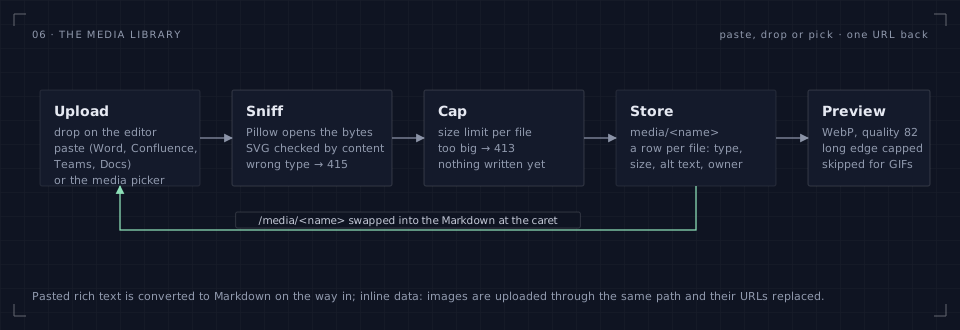
The media library is deliberately boring: files on disk outside the release tree (so a deploy never touches them), a row per file with its type, size and alt text, a WebP preview for the grid, and a nightly archive alongside the database backup. Uploads are validated by content, not by extension; a renamed executable is refused with a 415 before a byte is written.
An assistant that knows the site
The chat widget in the corner is a Claude model behind the API. What makes it useful rather than generic is the system prompt: it is rendered from the same content bundle as the pages, so it knows the timeline, the skills, the projects and the ventures exactly as they are today, and editing the content in the admin updates what it knows without a deploy.
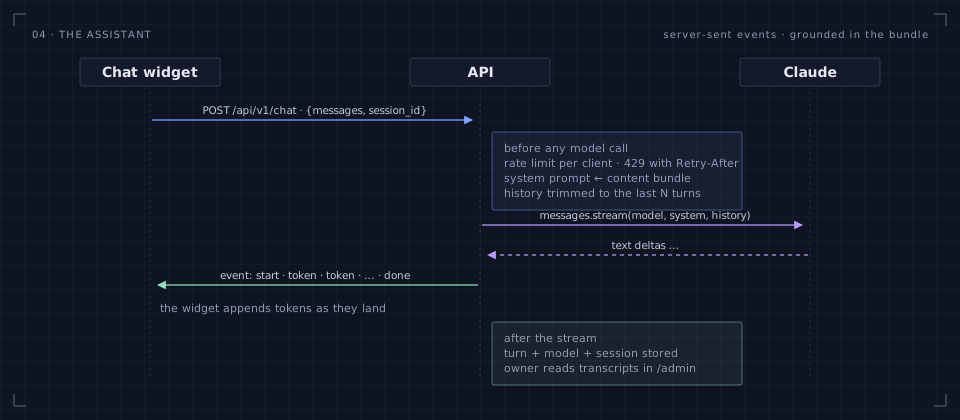
The request path is short. The API checks a per-client rate limit first and answers with a 429 and a Retry-After before any model is involved. It then trims the conversation to the last few turns, opens a streaming request to the model, and forwards each text delta to the browser as a token event over server-sent events, followed by a done event (or an error event, which the widget renders as a quiet apology rather than a stack trace). Caddy is told not to buffer that path, which is the one line of proxy configuration that matters for streaming.
async def body():
    yield svc.sse("start", {"session_id": str(session_id), "model": settings.chat_model})
    async for frame in svc.stream_reply(client, settings, system_prompt, history, outcome):
        yield frame
    # the turn is stored after the stream completes, never in its way
Every turn is stored with its session, and the admin has a transcript view. Reading those is how I found out which questions the content did not answer well, which fed back into the content. The assistant is also told, firmly, what it is not: it does not book meetings, it does not speculate about availability or rates, and it points at the contact form for anything that needs a reply from a person.
A résumé from the same data
The résumé page under About is the content bundle laid out as one scannable document, with a print stylesheet that drops the site chrome, the atmosphere and the rails. The PDF next to it is not a print of that page; it is built on request by the API with fpdf2, from the same bundle, in the plain single-column form that résumé scanners parse cleanly: standard section names, real text, no columns, no icons.
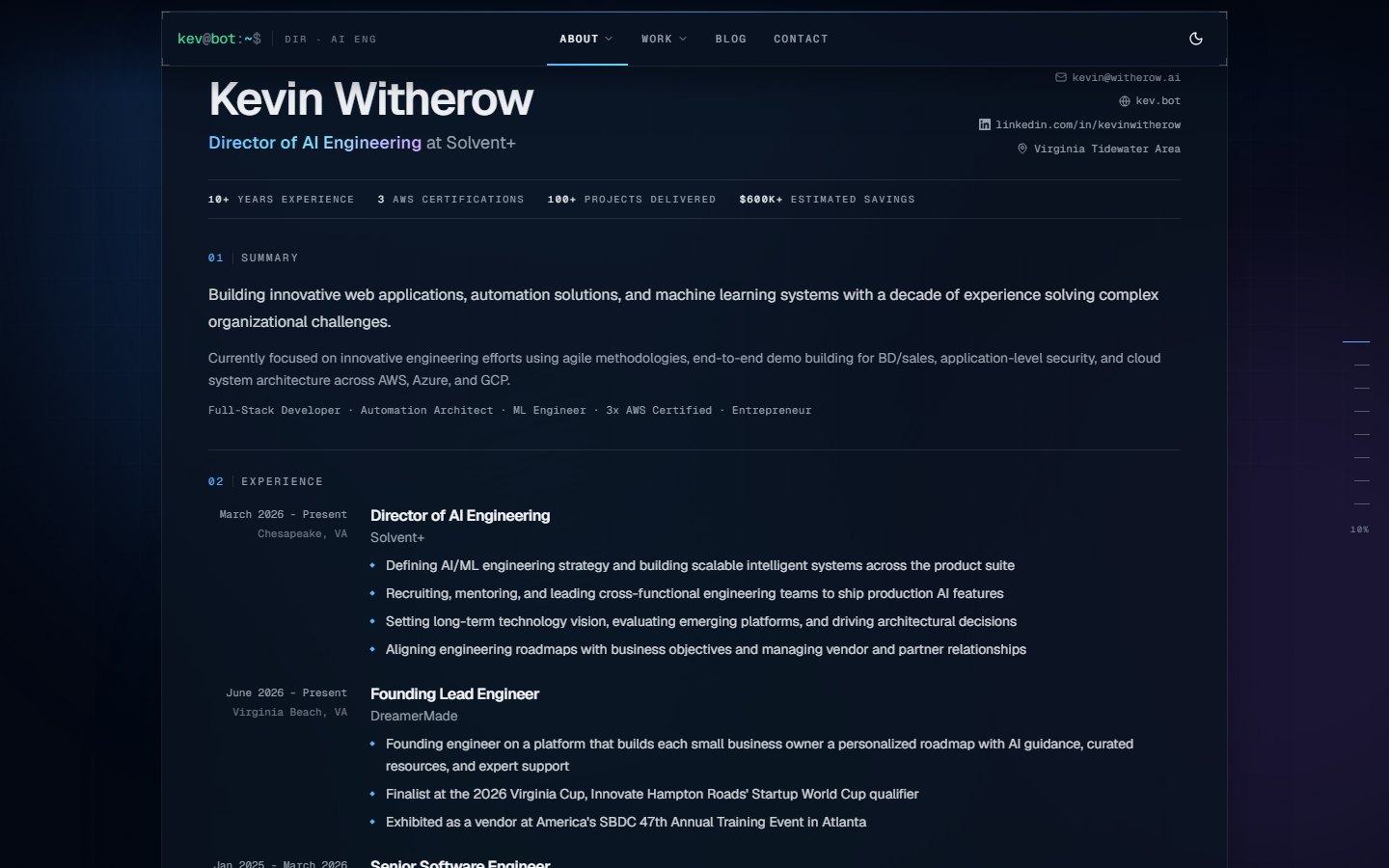
Two things about fpdf2 are worth knowing before you reach for it. The built-in fonts draw Latin-1 and nothing else, so every string passes through a small cleaner that maps dashes, curly quotes, ellipses and bullets to ASCII cousins and drops what cannot be drawn (a trademark sign, an emoji). The bullet glyph itself is drawn as a small square. And a long document needs orphan control: a section label at the foot of a page with its content on the next one looks broken, so sections and entries check whether they fit before they start and move to a new page if not. With three bullets per role and a tighter line height it lands on two pages, and the site keeps the full bullet lists.
Important: The PDF is served with a short cache and a download disposition, and the download link on the page is a plain anchor. No JavaScript is needed to get the file, which also means a crawler can.
Two environments, one box
The develop branch deploys to dev.kev.bot and main deploys to kev.bot. Both run on the same server as separate instances, each with its own release tree, its own API port on loopback, its own database, its own environment file and its own media folder. They share Caddy and nothing else.
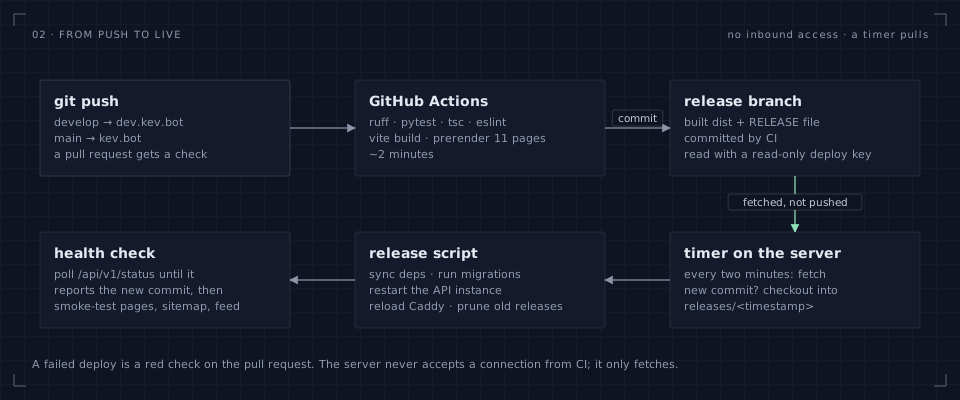
Nothing inbound is needed, which is the property I care about most. CI runs the Python linter and tests, the TypeScript compiler and ESLint, builds the UI and prerenders the routes, then commits the built output plus a small RELEASE file to a release branch. On the server, a timer fetches that branch every couple of minutes with a read-only deploy key and, if the commit changed, checks it out into a fresh release directory and runs the release script:
# The pull loop, trimmed. One of these runs per environment on its own timer.
git fetch -q --depth 1 origin "$RELEASE_BRANCH"
NEW=$(git rev-parse FETCH_HEAD)
[ "$NEW" = "$(cat .deployed)" ] && exit 0
git checkout -qf FETCH_HEAD
bash deploy/remote-setup.sh "$ENV"   # sync deps, migrate, restart the API instance, reload Caddy, prune old releases
echo "$NEW" > .deployed
The release script keeps the last five releases, so rolling back is a symlink change. The workflow, meanwhile, polls the environment's status endpoint until it reports the new commit, then smoke-tests the pages, the sitemap and the feed before the check goes green. A failed deploy shows up as a red check on the pull request, not as a surprise later.
| production | development | |
|---|---|---|
| Branch | main → a release branch |
develop → its own release branch |
| Host | kev.bot | dev.kev.bot |
| Content | reseeded on purpose, by collection | reseeded after every content change |
| Backups | nightly dump plus the media folder, fourteen kept | the same, because it is the same script |
Important: One quirk worth writing down: a freshly created repository did not run push-triggered workflows at all until Actions was toggled off and on once. Manual dispatch worked the whole time. If your first push sits there silently, that is the first thing to try.
Testing a site like a product
The API has a pytest suite (forty-odd tests across eleven files) that covers the content bundle and its seeding, the blog and the seed post, the media library, the assistant's streaming and rate limiting, the contact inbox, the auth flow, the SEO render and the résumé PDF. It runs against SQLite in CI and takes under ten seconds. Ruff keeps the Python honest; tsc and ESLint do the same on the other side.
The part that is less standard is visual verification. I run a local Chrome headless over the DevTools protocol and take screenshots of each page at desktop, phone and light-mode settings after every layout change, then look at them. That sounds laborious and is not: a sixty-line script captures sixteen views in about a minute, and the screenshots catch things no test would, like a tag strip stuck at opacity zero or a figure strip whose fourth cell is wider than its column.
The same script answers one question I now ask on every route, because the answer was wrong three times before I asked it:
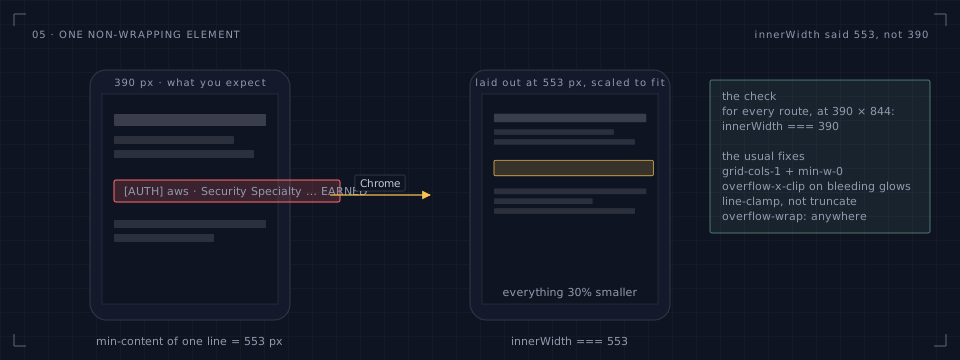
On a phone, a single element that cannot wrap does not merely stick out. Chrome widens the layout viewport to the content's minimum width and scales the page down to fit, so everything renders a third smaller and nothing looks broken enough to notice at a glance. innerWidth gives it away: it should equal the device width, and on three routes it did not. The culprits were a terminal log line with no explicit grid column, a truncate caption inside an intrinsically sized figure, and one unbreakable word set at figure size in a half-width cell. The fixes are one line each (grid-cols-1 with min-w-0, line-clamp instead of truncate, overflow-wrap: anywhere); finding them took a probe that hides elements one branch at a time and watches the document width.
The admin, briefly
Everything on the site is editable from the admin area, which is a separate chunk of the app behind an owner login and never downloaded by a visitor. It has six screens, and none of them took long to build because they are all forms over the same JSON:
| Screen | What it does |
|---|---|
| Content | One generated form per collection: lists you can reorder, nested objects, image fields that open the media picker, a diff of what changed before you save |
| Blog | The post list with drafts and published posts, the editor with paste conversion and a split preview, a cover picked from the library |
| Media | The grid, search, alt text, copy as URL or Markdown, delete |
| Inbox | Contact messages with a read state, newest first |
| Transcripts | The assistant's turns grouped by session |
| Settings | The assistant's switch and the handful of knobs it has |
The pattern that made this cheap is the spec. A collection's editor is described as data (field kinds, labels, help text, which fields are optional), and one component renders any spec. Adding the period and note fields to projects, which happened the day before this post went up, was a line in the Pydantic model, a line in the TypeScript type and two lines in the spec. The form, the validation and the API contract followed without another edit.
Sessions are signed with a server-side key and the API refuses to start a sign-in flow without one. There is one owner account, no registration, and the public API is read-only except for the contact form and the assistant, both of which are rate-limited per client.
What is and is not exposed
A personal site is still a server on the internet, so a short, honest list of the surface:
- One listener. Caddy is the only process that accepts connections from outside. The API binds to loopback, the database is reachable only from the box, and the assistant's upstream is an outbound call.
- Headers from the edge. Caddy adds
X-Content-Type-Options: nosniff, a strict referrer policy, frame denial and a permissions policy that switches off the camera, microphone and geolocation for every response, and strips its own server header. - No inbound deploys. The server pulls releases with a read-only key on a timer. There is no SSH from CI, no webhook, no agent.
- Strict schemas at the edge. Every content model forbids unknown fields, so an unexpected key is a validation error, not a stored surprise.
- Uploads are validated by bytes. The media library opens the file to decide what it is, caps the size before writing, stores files outside the release tree and serves them through the API with a long cache.
- Rate limits on the only writable paths. The contact form and the assistant both answer with a 429 and a
Retry-Afterwhen a client is too eager. - Backups you can restore. A nightly dump per environment with the media folder archived alongside it, fourteen copies kept, and a restore that is one command.
One editorial choice follows from that list: nothing in this post names a port, a path, a database or a host that is not already public. Those details would not help a reader build their own version, and they would help exactly one other kind of reader.
Accessibility and performance
The two overlap more than people expect, because both reward doing less.
- Everything interactive is keyboard-reachable. The career map's bars are focusable and show the same card on focus as on hover; the filter rows are real buttons; the section index is a list of links; the mobile tab bar is a
navwith the current page marked. - Charts have a text twin. The area chart on the projects page carries a visually hidden table of its points, and the career map's legend doubles as a list of ranges and durations.
- Colour is never the only signal. Series colours were checked for separation under the common forms of colour-vision deficiency in both themes with a small script that computes perceptual distance between adjacent hues; where two came out close, a second encoding (a label, a marker shape) carries the identity. Status colours are reserved for status and never reused for a series.
- Motion is optional. One global setting honours
prefers-reduced-motion; nothing on the site depends on an animation having played. - First paint has content. Prerendered HTML for every route, the seed bundle as initial data, and hashed assets with a year of cache behind an
index.htmlthat is never cached. The admin is a separate chunk. Previews are WebP. There is no font download for the body text that blocks rendering.
The boring parts: the CLI, backups and logs
Most of the operational surface is a single command with a few subcommands, which keeps the runbook short enough to remember:
kevbot seed --force --only timeline,skills   # push named collections from the repo's seed
kevbot seed-posts --force                    # overwrite seed posts by slug (this one, for instance)
kevbot export-content --out seed/content.json  # snapshot the database back into the repo
kevbot inbox                                 # read the contact inbox from a terminal
kevbot transcript                            # the assistant's recent turns
The status endpoint reports the release commit, so the same number the terminal card on the home page shows is the one CI polls for after a deploy and the one I check when something looks stale. Each environment has its own access log with rotation, and those logs are better debugging tools than they look: the invisible-card bug above was traced by reading the sequence of requests from one browser and noticing the request that never happened, because the data was already cached.
By the numbers
| Routes prerendered at build | 11 |
| Content collections | 10 |
| Timeline entries · skills · projects · ventures | 23 · 54 · 7 · 4 |
| API tests | 43, across 11 files, under ten seconds |
| JavaScript over the wire | about 320 kB compressed, admin excluded |
| Diagrams in this post | 7, all drawn by one script from a shared style |
| Résumé PDF | 2 pages, built on request from the live content |
| Deploy, push to live | about four minutes, hands off |
Things that bit me
A short list, in the order they happened, for anyone searching for the symptom:
- Gesture variants do not reach late children. Described above. Drive the variant through
animate, gate it withonViewportEnter. - A SPA's shell is not empty after prerendering. Replace whatever the root holds, not a literal empty div.
- Headless Chrome keeps an HTTP cache per profile. A reused profile served a stale content bundle for a full round of screenshots; disable the cache over the protocol or use a fresh profile.
- Restart before reseed. A strict schema in a running process rejects rows carrying a field it has not loaded yet.
- Core PDF fonts are Latin-1. Clean every string; draw bullets as shapes.
- One non-wrapping element zooms a phone out. Assert
innerWidthequals the device width on every route. - New repositories may ignore push triggers. Toggle Actions off and on.
- Windows line endings and inline patch scripts do not mix. Patches live in files and normalise line endings; a one-liner with quotes inside quotes inside quotes is a bug generator.
Still on the list
- [x] Owner admin for every collection, the blog, the media library and the inbox
- [x] Per-route prerendering and API-rendered post pages
- [x] Section index, floating header, mobile tab bar
- [x] A résumé as a PDF generated from the content bundle
- [x] Organisation logos, sites and hover details on the career map
- [ ] Per-project pages with more of the numbers
- [ ] A GitHub activity card that doesn't need a token
- [ ] Search across posts and projects, probably client-side
If you have built something similar and landed on different trade-offs, I would like to hear about it. The source is on GitHub, and the contact form on this site goes straight to the inbox I actually read[^1].
[^1]: Every message is stored in the database first and emailed second, so a mail outage never loses one.